
Egy email nem érkezett meg. Kerestem a hostingert, és ezeket a dolgokat tanácsolták:
Easy:
Másik:
1.A főoldalon bemegyek az emailbe….ott kikersem az domain emailjét
2. Bal oldalon configuration settings
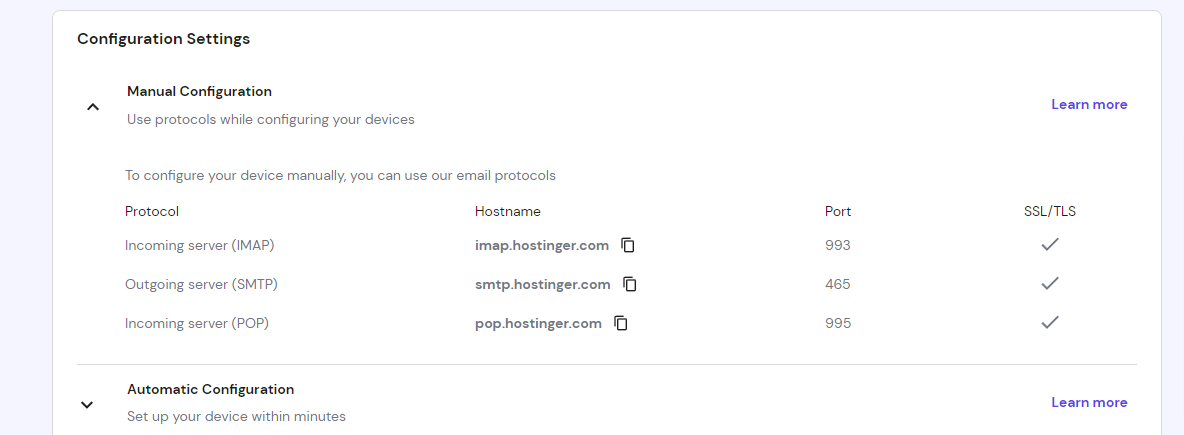
3.A kimenő – outgoing a fontos (smtp)
4.Wp mail smtp plugin aktiválás…madárka jel
5.A videó settingje alapján nem engedte az ellején megadni, hogy melyik e-mail címről. Mert gmail-os cím van megadva a wordpressben. Ekkor vállasztottam a első varázsló megoldást. Ott megadhattam. A végén a loginhoz és jelszóhoz a az email címet kell megadni ahonnan a contact formok szerint az emailek mennek.
6.Aztán a plugin még berakat egy txt rekordot: https://wpmailsmtp.com/how-to-create-dmarc-record/
Test- email..ha minden oké akkor succies
Hogy ne jöjjön a dmarc report a dns-ben valeunaé kihagyom az emailt: v=DMARC1; p=none; (nem kell a /fo/ sem)
Egy másik alkalommal állítottam be carcode oldalnak. Akkor a chat a hostingerrel:

DMARC helps email administrators ensure their domain’s security and reputation, helping to prevent attacks like spoofing.
The Domain-based Message Authentication, Reporting, and Conformance (DMARC) let you tell receiving servers what to do with outgoing messages from your organization that don’t pass SPF or DKIM.
To add a DMARC record in your domain’s DNS zone, you need to create a TXT record with the following values:
Type: TXT Record
Hostname: _dmarc
Value:v=DMARC1; p=none; fo=1; rua=mailto:me@example.com
Change the me@example.com to the email being configured. To add DMARC for multiple emails, follow the pattern below:
v=DMARC1; p=none; fo=1; rua=mailto:me@example.com, mail to:email2@example.com, mailto:email3@example.com
The „rua” attribute sends reports on how your domain is being used to send emails. The report is sent to the email defined as the value of this attribute „rua”. If multiple emails are defined for the „rua” attribute, as in the example above, they will all receive the report.
If you don’t want to receive the reports, you can omit the „rua” attribute and leave the DMARC record value just like this:
v=DMARC1; p=none
Should you have any further queries, please let me know!
Here are your Hostinger server configurations:
SMTP:
Host: smtp.hostinger.com
Port number: 465
Encryption: SSL/TLS
Username: your email address
Password: your email password
Please give it a try and let me know how it goes!